| View previous topic :: View next topic |
| Author |
Message |
c0op3r
Joined: 29 Sep 2011
Posts: 11
Location: Orlando Fl
|
 Posted: Tue Nov 01, 2011 8:41 pm Post subject: Need help finding some Intel Logo(s) Posted: Tue Nov 01, 2011 8:41 pm Post subject: Need help finding some Intel Logo(s) |
 |
|
I have been buying some more chips for my Intel Processor Collection/Displays, the two that I am working on right now are:
the Pentium Pro - 
That image was easy to find, but I am having a hard time finding the i486 logo for my 486 chip display.
The display is going to have a 486SX, 486DX & 486DX2.
Does anyone have any good logo images or links to good i486 logos?
c0op3r |
|
| Back to top |
|
 |
Katmai500
Joined: 30 Sep 2010
Posts: 360
Location: Southern NJ, USA
|
| Posted: Tue Nov 01, 2011 9:17 pm Post subject: |
|
|
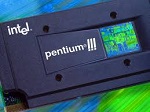
Prior to the original Pentium the logo on the outside of the computer was just an intel inside logo. There was no mention of 80486 or 486 on the case sticker/logo.
Pardon the quality, but the attached image is the only example picture i could find quickly.
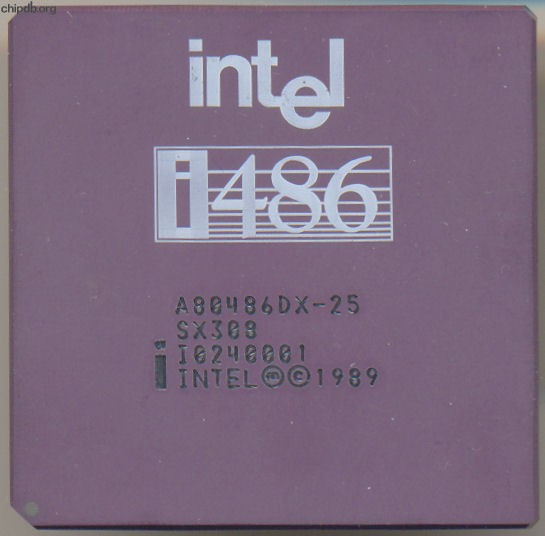
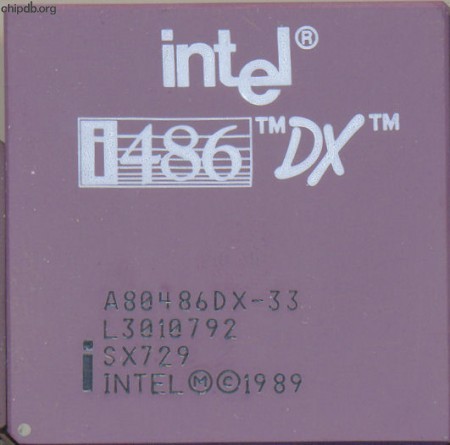
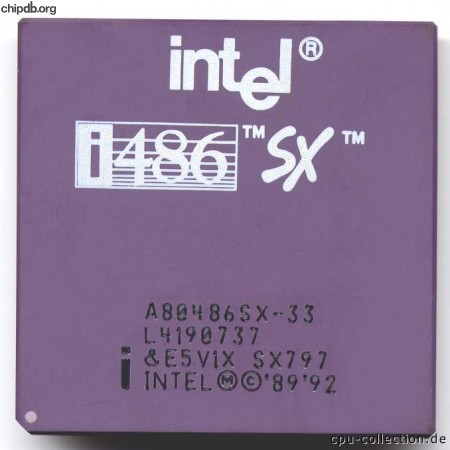
The only other 486 logo would be the 486 text on the CPU itself.
 |
|
| Back to top |
|
|
c0op3r
Joined: 29 Sep 2011
Posts: 11
Location: Orlando Fl
|
| Posted: Tue Nov 01, 2011 9:23 pm Post subject: i486 logo |
|
|
Yes I have the Intel Inside logo already, but I was really looking for a better version of this logo:

which is the same one from the chip, but its just not very clean. |
|
| Back to top |
|
|
Neon_WA

Joined: 08 Nov 2008
Posts: 7146
Location: Margaret River, West Australia
|
| Posted: Tue Nov 01, 2011 9:23 pm Post subject: |
|
|
| rflynn88 wrote: | Prior to the original Pentium the logo on the outside of the computer was just an intel inside logo. There was no mention of 80486 or 486 on the case sticker/logo.
|
rflynn is quite correct....
so only way to get one is scan logo off chip and play around in photoshop with it
the black plastic 486 maybe the easiest to work from
_________________
There are 10 types of people in this world:
those who understand binary and those who don't. ~Author Unknown
http://www.x86-guide.net/Neon-WA/en/collection.html |
|
| Back to top |
|
|
Katmai500
Joined: 30 Sep 2010
Posts: 360
Location: Southern NJ, USA
|
| Posted: Wed Nov 02, 2011 5:18 pm Post subject: |
|
|
| The i486 logo on the chip itself is pretty simple. If cleaning up one scanned off of an actual chip doesn't work well there is another option. If you can find a match for the font it would be pretty easy to make a duplicate in photoshop or a similar program. It could be worth a shot. |
|
| Back to top |
|
|
debs3759

Joined: 18 Jan 2006
Posts: 9477
Location: Northampton, Divided Kingdom
|
| Posted: Wed Nov 02, 2011 5:48 pm Post subject: |
|
|
A couple of minutes in photoshop with the SX797 pictured above gave me:
_________________
My graphics card database can be found at http://www.gpuzoo.com.
I can resist anything except temptation.
Debs |
|
| Back to top |
|
|
c0op3r
Joined: 29 Sep 2011
Posts: 11
Location: Orlando Fl
|
| Posted: Wed Nov 02, 2011 6:14 pm Post subject: |
|
|
| debs3759 wrote: | | A couple of minutes in photoshop with the SX797 pictured above gave me: |
First let me say thanx!
Second I am not that good with Photoshop. |
|
| Back to top |
|
|
debs3759
Joined: 18 Jan 2006
Posts: 9477
Location: Northampton, Divided Kingdom
|
| Posted: Wed Nov 02, 2011 6:17 pm Post subject: |
|
|
I didn't think I was that good with it, but as I had just installed it on my new system today thought I'd have a go. All I had to do was convert it to grayscale and then auto-set the contrast, far easier than I would have guessed 
Glad it's good for you.
_________________
My graphics card database can be found at http://www.gpuzoo.com.
I can resist anything except temptation.
Debs |
|
| Back to top |
|
|
|


![[ Hidden ]](https://cdn.cpu-world.com/forum/templates/CPUWorld/images/lang_english/icon_email.gif "[ Hidden ]")
