| View previous topic :: View next topic |
| Author |
Message |
BAEZ
Joined: 21 May 2008
Posts: 4
Location: Miami, FL
|
 Posted: Thu May 29, 2008 11:45 pm Post subject: Installing AMD Athlon XP 3200-AXDA3200DKV4E what went wrong? Posted: Thu May 29, 2008 11:45 pm Post subject: Installing AMD Athlon XP 3200-AXDA3200DKV4E what went wrong? |
 |
|
Hi Guys so here is the deal. I have two issues.
Here is #1:
I recently purchased a USED Processor AMD Athlon XP 3200-AXDA3200DKV4E to upgrade my current AMD Athlon XP 2900+ - AXDA2900DKV4E.
So I unplug my computer, power and all, place on rubber mat, wear the antistatic wrist - grounded - and off we go... Remove heatsink, remove old processor, placed new processor, place heatsink.. plug everything back in. Now this is what happened next:
1st Atempt: Screen was black and my monitor was not detecting and signals. Restart
2nd Restart: Seems like computer is going to load succesfully but right before it hits the windows splashscreen it goes black and does nothing.
3rd Restart: This time it loaded completely, but when it got to the windows login screen and i scrolled my mouse over my user name, that area turned black but i was still able to load my windows user. So the computer does its thing and loads itself but extremly slowly. I wait for it to load completly and open CPU-Z, while its loading my screen goes black and computer does not restart just stays black.
4th Restart: Blackness, nothing happened...
So i decide to put the old processor back in place, while im doing this, the heatsink is hot hot, so is the processor, which i thought was weird because when i had the previous processor in there I would never turn off the computer and it never got as hot as this one did. So i figured this eBay purchase was a damaged one, ill live with it! But why did it attempt to work in the first place? interesting :/
So this is where my second issue comes in. My "old" processor advertises:
Family AMD Athlon XP
Part number AXDA2900DKV4E
Stepping code AQYHA
Frequency (MHz) ? 2900 (rated)
2000 (real)
Bus speed (MHz) ? 400
Clock multiplier ? 10
http://www.cpu-world.com/CPUs/K7/AMD-Athlon%20XP%202900%2B%20-%20AXDA2900DKV4E.html[url][/url]
But this is what my computer is running at:
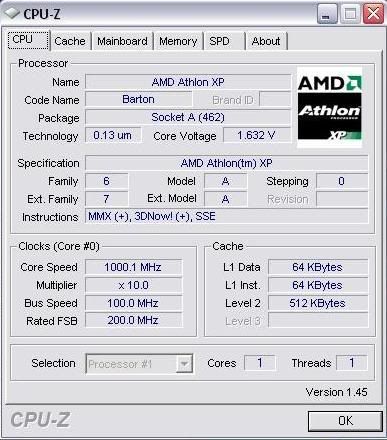
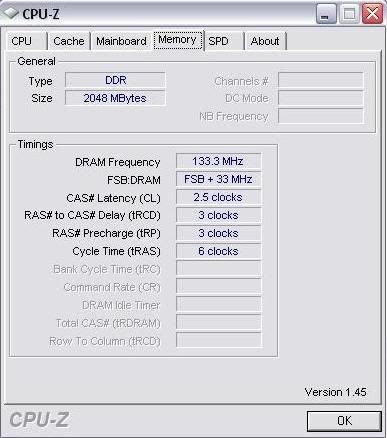
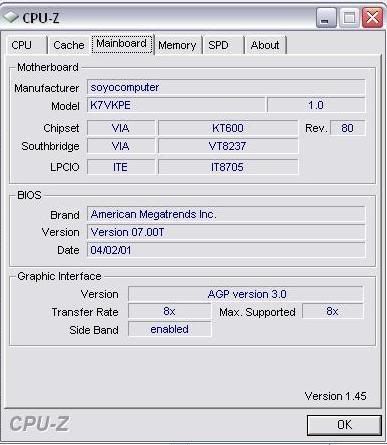
Now before purchasing the new processor i called soyo to see if the processor was compatible with my MB and they told me YES! But how can I get the old processor AXDA2900DKV4E to run at the speed it advertises?
Thanks for your help! 
_________________
www.myspace.com/jasonbaez |
|
| Back to top |
|
 |
D.8080

Joined: 03 Apr 2006
Posts: 1474
Location: Italy
|
| Posted: Fri May 30, 2008 5:44 am Post subject: |
|
|
You have to set the FSB to 200 mhz so effectively going to 400 mhz.
Read your manual to find out. |
|
| Back to top |
|
|
BAEZ
Joined: 21 May 2008
Posts: 4
Location: Miami, FL
|
| Posted: Fri May 30, 2008 1:26 pm Post subject: |
|
|
| dume wrote: | You have to set the FSB to 200 mhz so effectively going to 400 mhz.
Read your manual to find out. |
I dont have a manual for the MB! 
Also, could this be the same issue as to why the "New" processor did not work?
_________________
www.myspace.com/jasonbaez |
|
| Back to top |
|
|
Cobracon

Joined: 28 Aug 2007
Posts: 216
Location: Roosterpoot, MS; US of A (Obama country!)
|
| Posted: Fri May 30, 2008 2:12 pm Post subject: |
|
|
Find out what the model & revision number are for your board. Then go the the manufacturer's website and download a manual. Experimenting without a motherboard manual (unless you know your motherboard by heart) places a person in the predicament you're in right now, Dig?? 
_________________
"Have you scanned the RAM timings for Operator's Headspace?? Too much real estate between the audio collectors will block the connection which allows proper operation of your computer."_Cobra
 |
|
| Back to top |
|
|
BAEZ
Joined: 21 May 2008
Posts: 4
Location: Miami, FL
|
| Posted: Fri May 30, 2008 2:26 pm Post subject: |
|
|
| Cobracon wrote: | | Find out what the model & revision number are for your board. Then go the the manufacturer's website and download a manual. Experimenting without a motherboard manual (unless you know your motherboard by heart) places a person in the predicament you're in right now, Dig?? |
I dig!
I just spoke with someone from SOYO and they said I should restart the CMOS and that would bring back factory setting for the MB. They also said that maybe the heatsink isnt sitting the proper way on the processor and thats why it got hot so fast. That I should properly position the heatsink then boot again! ill try this tonight and see what happens!
Thanks...
_________________
www.myspace.com/jasonbaez |
|
| Back to top |
|
|
Guest
|
| Posted: Sat May 31, 2008 12:09 am Post subject: |
|
|
I fixed the problem!!!!!!!!!!!!!!!!!!!!!!!!!!!!!!!!
The reason why the heatsink and processor was getting hot is becuase of all the collecting dust inside the heatsink! i cleaned that!
Then i set the JP3 jumpers 1&2 - 3-4 to ON and my MB was running at 200FSB... so i put on the new AMD XP 3200+ processor and when i reboot the pc it went as normal... Now my computer is registering at 2300MHz!
Oh and i also reset the CMOS!
Thanks guys for your help!  |
|
| Back to top |
|
|
D.8080
Joined: 03 Apr 2006
Posts: 1474
Location: Italy
|
| Posted: Sat May 31, 2008 2:43 am Post subject: |
|
|
| Happy upgrade! |
|
| Back to top |
|
|
|


